Reducing Lambda memory does not always reduce Lambda cost.
I recently tuned an AWS Lambda function that processes medical-report notifications received through Amazon SQS.
This is not a minimal Lambda function. It runs on a PowerShell custom runtime and uses multiple Lambda layers, including:
- the PowerShell runtime;
- Firely SDK assemblies for parsing FHIR R4 messages;
- AWS Tools for PowerShell;
During a cold start, Lambda must create the execution environment, load the custom runtime, make the layers available, import the modules and load the .NET assemblies before processing the message.
That matters because Lambda memory is also a performance setting. AWS allocates CPU in proportion to configured memory, so reducing memory can slow runtime initialisation and execution.
The test
I compared four memory settings using the same synthetic medical-report notification.
For each setting, I collected four confirmed cold starts and measured:
- billed duration;
- initialisation duration;
- maximum memory used;
- billed GB-seconds.
GB-seconds are the key cost measure because Lambda compute usage depends on both allocated memory and execution duration.
The results
| Memory | Average billed duration | Average GB-seconds |
|---|---|---|
| 384 MB | 13.83 seconds | 5.187 |
| 512 MB | 10.88 seconds | 5.442 |
| 624 MB | 8.77 seconds | 5.343 |
| 768 MB | 7.29 seconds | 5.467 |
Maximum memory use stayed close to 330 MB throughout, but execution became faster as the configured memory increased. Because AWS allocates CPU in proportion to Lambda memory (reference: Configure Lambda function memory – AWS Lambda), the results suggest that the workload benefited from the additional compute capacity rather than from additional usable RAM.
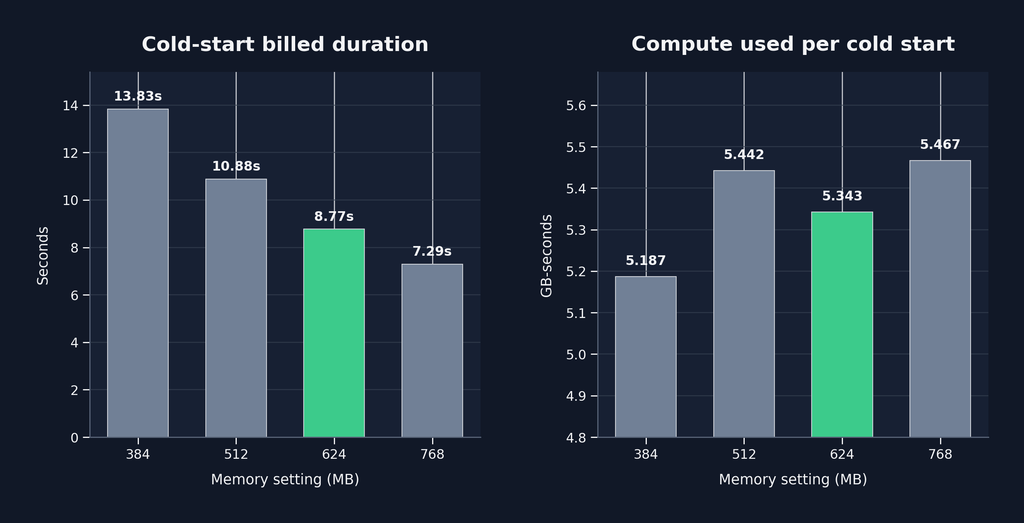
The 384 MB setting produced the lowest GB-second figure, but it was approximately 58% slower than 624 MB for a saving of only around 3%.
More unexpectedly, 512 MB was both:
- approximately 24% slower than 624 MB;
- approximately 2% more expensive in measured GB-seconds.
Reducing memory had made the function slower without making it cheaper.
At 768 MB, execution was faster again, but compute use increased slightly. For this asynchronous SQS workload, that additional speed was not valuable enough to justify the extra capacity.
Why 624 MB?
The 624 MB value was not originally selected as a carefully calculated target. It was simply a value reached while increasing memory during earlier testing.
In hindsight, 640 MB would have been a more logical test point, because it is a multiple of 128 MB. However, 624 MB was the setting for which we already had operational and performance evidence, and the results showed it to be the best tested balance.
The lesson
Do not size Lambda functions using maximum memory consumption alone.
This function using approximately 330 MB was not necessarily best configured with just a little headroom at 384 MB. Memory allocation also affects the CPU available for:
- custom-runtime startup;
- module imports;
- Lambda layer loading;
- dependency initialisation;
- parsing;
- serialisation;
- application processing.
Lamdba functions clearly need tuning once created. Don’t just ask if there’s enough memory to complete execution, instead:
Which memory setting gives the best balance of execution time, compute usage and operational performance?
For this function, the sweet spot was 624 MB.
Sometimes the cheapest way to run a Lambda function is to stop starving it.